Difference between revisions of "Canvas Menu Caret"
From Synfig Studio :: Documentation
m |
|||
| Line 1: | Line 1: | ||
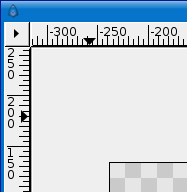
Whereas most graphics apps have a set of menus at the top of the screen, the top of the MDI window, or the top of the drawing window, Synfig has a caret. A sideways one. It is located in the upper left hand corner of the Canvas window, and looks like this: | Whereas most graphics apps have a set of menus at the top of the screen, the top of the MDI window, or the top of the drawing window, Synfig has a caret. A sideways one. It is located in the upper left hand corner of the Canvas window, and looks like this: | ||
| − | + | <br> | |
| − | > | + | http://i170.photobucket.com/albums/u243/zenoscope/caret1.png |
| + | <br> | ||
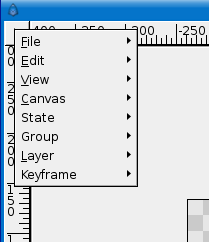
Beneath this button are all the menus you'd expect, and where you can access most of Synfig Studio's features: | Beneath this button are all the menus you'd expect, and where you can access most of Synfig Studio's features: | ||
| + | |||
| + | |||
| + | <br> | ||
| + | http://i170.photobucket.com/albums/u243/zenoscope/caret.png | ||
| + | <br> | ||
* [[File Menu]] | * [[File Menu]] | ||
Revision as of 12:12, 22 March 2007

Whereas most graphics apps have a set of menus at the top of the screen, the top of the MDI window, or the top of the drawing window, Synfig has a caret. A sideways one. It is located in the upper left hand corner of the Canvas window, and looks like this:
Beneath this button are all the menus you'd expect, and where you can access most of Synfig Studio's features: