Difference between revisions of "Canvas Properties Dialog"
From Synfig Studio :: Documentation
m (New Canvas Dialog moved to Canvas Properties Dialog) |
|||
| Line 4: | Line 4: | ||
http://i170.photobucket.com/albums/u243/zenoscope/properties.png | http://i170.photobucket.com/albums/u243/zenoscope/properties.png | ||
| − | This is the dialog | + | <span style="font-size:80%">This image needs to be updated</span> |
| − | + | ||
| + | This dialog is used for stablish the properties of the current main canvas. This dialog is automatically shown when you first start a project if the SYNFIG_ENABLE_NEW_CANVAS_EDIT_PROPERTIES [[Environment Variables|environment variable]] is defined. In here you can set the following parameters: | ||
| + | |||
| + | #Canvas Info: | ||
| + | #* Name | ||
| + | #* Description | ||
| + | #Image Size: | ||
| + | #* Width | ||
| + | #* Height | ||
| + | #* X Resolution | ||
| + | #* Y Resolution | ||
| + | #* Physical Width | ||
| + | #* Physical Height | ||
| + | #Image Area: | ||
| + | #* Top Left (x,y) | ||
| + | #* Bottom right (x,y) | ||
| + | #Locks and Links: | ||
| + | #* Pixel Aspect | ||
| + | #* Pixel Width | ||
| + | #* Pixel Height | ||
| + | #* Image Aspect | ||
| + | #* Image Width | ||
| + | #* Image Height | ||
| + | #* Image Span | ||
| + | #Time Info: | ||
| + | #* Frames per second | ||
| + | #* Start Time (seconds) | ||
| + | #* End Time (seconds) | ||
| + | #Other: | ||
| + | #*Focus Point | ||
| + | |||
To change these parameters while working on a project, go to the [[Canvas_Menu_Caret|caret menu]], select '[[Edit Menu|edit]]' and then 'properties'. | To change these parameters while working on a project, go to the [[Canvas_Menu_Caret|caret menu]], select '[[Edit Menu|edit]]' and then 'properties'. | ||
Revision as of 18:14, 4 June 2008


This image needs to be updated
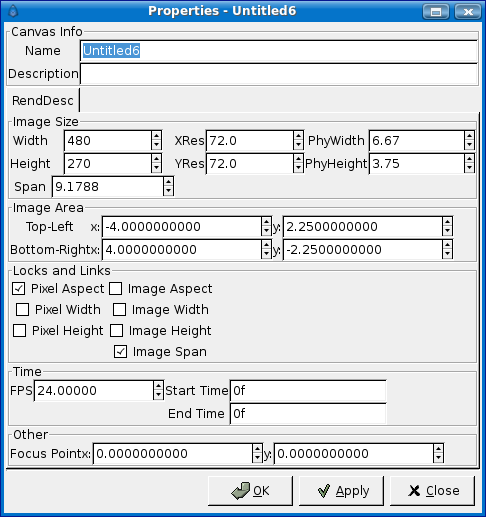
This dialog is used for stablish the properties of the current main canvas. This dialog is automatically shown when you first start a project if the SYNFIG_ENABLE_NEW_CANVAS_EDIT_PROPERTIES environment variable is defined. In here you can set the following parameters:
- Canvas Info:
- Name
- Description
- Image Size:
- Width
- Height
- X Resolution
- Y Resolution
- Physical Width
- Physical Height
- Image Area:
- Top Left (x,y)
- Bottom right (x,y)
- Locks and Links:
- Pixel Aspect
- Pixel Width
- Pixel Height
- Image Aspect
- Image Width
- Image Height
- Image Span
- Time Info:
- Frames per second
- Start Time (seconds)
- End Time (seconds)
- Other:
- Focus Point
To change these parameters while working on a project, go to the caret menu, select 'edit' and then 'properties'.

